Evaluating Free VPNs: What "No-Log" and "Safe" Really Mean
A free VPN can be safe if it comes from a reputable provider that funds the free tier through paid subscriptions, publishes a clear no-logs policy backed by independent audits, and limits the free tier in visible ways such as data caps or fewer servers. Free VPNs that make money in hidden ways, such as selling data or showing invasive ads, can leave you worse off than using no VPN at all. Plans, data allowances and prices change often, so this guide explains how to check a provider yourself rather than ranking current offers.
How Free VPNs Pay for Themselves
- Freemium: a limited free tier encourages upgrades to a paid plan. This is the most transparent model.
- Advertising: ads inside the app; check whether ads are targeted using your data.
- Data collection or resale: the riskiest model. If the privacy policy allows sharing browsing data with third parties, avoid it.
- Bandwidth sharing: some services route other users' traffic through your connection; read the terms carefully.
What Makes a VPN Truly No-Log
"No-logs" should mean the provider does not keep records of the sites you visit, the content of your traffic, or your connection timestamps and IP addresses in a way that could identify your activity. Read the privacy policy for exactly what is collected; many services keep minimal data such as account email or aggregate usage to run the service. Stronger assurances include:
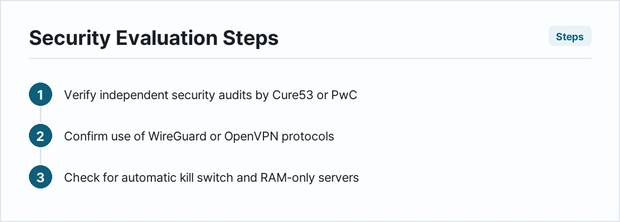
- Independent audits by a named firm, with a date and a published report or summary.
- Transparency reports describing legal requests and how the company responded.
- Open-source apps that outside experts can inspect.
- Jurisdiction: where the company is based affects what it can be compelled to share.
Security Features to Check
- Modern protocols such as WireGuard or OpenVPN.
- A kill switch that blocks traffic if the VPN drops.
- DNS leak protection; test with an independent DNS leak test site after connecting.
- No requirement for unnecessary personal information to sign up.
Free-Tier Limits to Expect
Reputable free tiers usually restrict at least one of: monthly data, server locations, speed, number of devices, or streaming support. A tier that claims to be unlimited in every way with no paid upgrade deserves extra scrutiny about how it is funded. Check the provider's current free-plan page for the exact limits before relying on it.
How Free VPN Speeds Compare
Free servers are often more crowded than paid ones, especially at peak times. Speed also depends on distance to the server, your internet connection and the protocol. Run a speed test with the VPN off and on, using a nearby server, at the times you normally use it.
Red Flags
- A privacy policy that allows selling or sharing browsing data.
- No company name, address or way to contact support.
- Requests for excessive app permissions on your phone.
- Apps from unofficial download sites.
- Promises of total anonymity; a VPN hides traffic from your network and ISP but doesn't make you anonymous to sites you sign in to.
When a Paid VPN Makes More Sense
If you need a VPN every day, stream regularly, use many devices, or rely on it for sensitive work, a reputable paid plan usually offers more servers, better speeds and fewer limits. Compare the total charged for the full term and the renewal price on the provider's checkout page, and read the refund terms.
What a VPN Does and Doesn't Do
A VPN encrypts traffic between your device and the VPN server, which protects you on public Wi-Fi and hides your browsing from your local network and internet provider. It does not protect against malware, phishing or weak passwords, and websites you sign in to still know who you are. Keep your devices updated and use strong, unique passwords alongside any VPN.
Comparison: What to Record for Each Free VPN
| Check | Where to find it | Good sign |
|---|---|---|
| Funding model | Pricing page, terms | Free tier supported by paid plans |
| Logging policy | Privacy policy | Clear, specific, minimal data |
| Audit | Audit or transparency page | Named auditor, recent date, published findings |
| Free-tier limits | Free plan page | Limits stated clearly |
| Security features | App settings, feature list | Kill switch, DNS leak protection |
Using a Free VPN on Public Wi-Fi
Public Wi-Fi in cafes, airports and hotels is the most common reason to use a VPN. Connect to the VPN before opening apps or sites that handle sensitive information, and make sure the app shows a connected status. Even with a VPN, stick to sites using HTTPS, avoid entering sensitive data on networks you don't trust if you can wait, and turn off automatic connection to open Wi-Fi networks on your devices. If the free tier's data cap runs out mid-trip, the VPN may disconnect; check whether the app warns you or blocks traffic with a kill switch.
Testing a Free VPN Before Relying on It
- Install only from the official app store or provider website.
- Connect and check that your public IP address shows the VPN server's location.
- Run a DNS leak test and, if available, a WebRTC leak test in your browser.
- Test speed at the times you'll use it.
- Turn on the kill switch and confirm traffic stops when you disconnect the VPN manually.
- Read the privacy policy one more time before signing in to sensitive accounts.
Free VPN Browser Extensions
Some providers offer free browser extensions that protect only browser traffic, not other apps. Check what an extension covers and what permissions it requests, and remember that apps outside the browser are not protected.
Frequently Asked Questions
Are free VPNs safe?
Some are, from reputable providers with paid tiers and audited no-logs policies. Others fund themselves by collecting data. Read the privacy policy first.
Can a free VPN unblock streaming services?
Free tiers often limit streaming, and streaming services may block VPNs and restrict viewing by location under their terms.
Do I need a VPN at home?
Not always. It's most useful on public Wi-Fi or if you want to hide browsing from your internet provider.
How can I verify a no-logs claim?
Look for independent audits with published reports and a transparency report; you can't verify it yourself from the app.
Alternatives to a Free VPN
If you mainly want safer browsing on public Wi-Fi, other options may cover your needs. Your phone's mobile data connection is often safer than open Wi-Fi. Some browsers and operating systems include privacy features or relay services that hide your IP address from websites. Some antivirus suites and password managers bundle a VPN; check the provider's privacy policy and data limits the same way you would for a standalone VPN.
Key Takeaways
- Prefer free tiers from providers funded by paid plans.
- Read the privacy policy and look for recent independent audits.
- Check kill switch and DNS leak protection.
- Expect visible limits; be wary of "unlimited free" offers.